
Hit Em Up: Mass Text Bulk SMS
Praiseworthy Apps LLCCommunication
4.5318.00 Reviews
- Version
- 3.28.0
- Installs
- 50.00K
- Age Rating
- Everyone
Screenshots
Our Review of Hit Em Up: Mass Text Bulk SMS
 Analysis by Appyee
When I need to reach several people with one message, I want a faster workflow without making the message feel like a cold broadcast. That is the problem Hit Em Up: Mass Text Bulk SMS is built around. It is a communication app from Praiseworthy Apps LLC, and its main appeal is the ability to prepare a message for a group while keeping each recipient’s note personal. I see it as a practical tool for planned group communication, rather than a replacement for every kind of messaging.
Readability and navigation for everyday tasks
For this kind of app, the important test is whether I can move from choosing recipients to checking a message without losing track of what I am about to send. The published experience is organized around familiar actions: work with contacts, choose a group, write a text, review it, and send it. That straightforward sequence is helpful if you do not want to learn a complicated campaign system just to share an event reminder.
The app has an average rating of 4.4 from 736 ratings, and it has passed 50K+ installs. Those figures give a sense of its audience, but they cannot tell me whether every screen will suit every person. In practice, the useful question is whether the steps feel understandable to you. I would start with a small contact group, read each screen carefully, and confirm the recipient list before sending anything important.
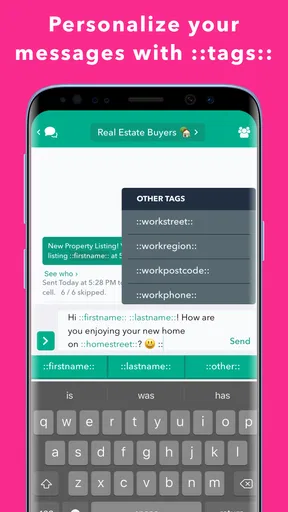
Personalization makes the workflow more than a shortcut. A group message can still address each person by name, which helps a reminder feel directed rather than copied to a crowd. I would keep the text itself concise and check how the personalized version reads before sending. A name inserted into a sentence can make a note warmer, but it can also make awkward wording more noticeable if the sentence was written too generally.
Motor and sensory considerations
Bulk messaging can reduce repeated typing and the number of separate conversations I have to open. That is useful if tapping through a long contact list or composing the same text again and again is tiring. Reviewing one prepared message also gives me a moment to catch a wrong date or unclear instruction before it reaches several people.
There is a trade-off: selecting a broad audience is a consequential action, so speed should not replace care. I would avoid rushing through contact selection, especially when names are similar or a message is meant for only part of a group. A deliberate check is more valuable than shaving off a few taps. If you find small controls or dense contact lists uncomfortable, take the process slowly and use the preview as a final pause rather than treating it as a formality.
Situational access and the right kind of message
The app is most useful when a message has a clear purpose and the recipients are already people you should be contacting. For example, if a family gathering is moved to a different time, a single prepared update can be sent to relatives without writing the same explanation repeatedly. The personal touch can make each text feel less like an impersonal announcement, while the shared wording keeps everyone on the same page.
It is also worth distinguishing a group text workflow from a full customer-support or team-chat system. Hit Em Up is aimed at sending messages in bulk, not at replacing an ongoing conversation where people need to reply to one another, track decisions, or share files. For those situations, an established group chat or collaboration app is usually the better fit. I would use this app for a one-way update or a carefully managed reminder, and choose a chat space when discussion is the point.
Where accessibility and convenience still meet limits
Ease of use depends on more than a clean sequence of actions. A person may need larger text, stronger contrast, screen-reader support, or fewer steps because of vision, hearing, dexterity, attention, or fatigue. I would not assume the app meets a particular accessibility standard without checking it on the device and settings I actually use. A practical trial with a low-stakes message is the best way to see whether reading, selecting contacts, and reviewing the final text work comfortably.
Context matters, too. If you are preparing a message while distracted, in a noisy place, or with only a short window to act, the ability to draft and inspect the wording can help—but sending to many people still calls for concentration. I would prepare the message when I can focus, verify names and details, and send only after the preview looks right. For time-sensitive emergencies, I would not rely on a bulk-text workflow as the sole way to reach people; a direct call or another established alert method may be more appropriate.
Who benefits, and who should look elsewhere
This app makes the most sense for people who repeatedly send similar, legitimate updates to a known set of contacts: a small organization coordinating an event, a family member arranging a get-together, or someone sharing a practical group reminder. It can also suit people who want personalization without manually composing a separate message for each person. If you only text groups occasionally, your phone’s built-in messaging may already be enough, and learning another workflow may not save you much time.
I would also pause before using it for frequent promotional messaging. A convenient sending tool does not make every recipient welcome a bulk text. Keep the audience relevant, respect people’s preferences, and make the purpose clear. If you need detailed campaign reporting, formal consent management, or a shared inbox for replies, a dedicated business messaging service may be a more suitable choice than a contact-based mass-text app.
Why Hit Em Up?
Picture this: You’ve got a big event coming up, and you need to inform everyone on your list. Instead of spending hours copy-pasting messages, Hit Em Up steps in to save the day. It’s designed to make mass texting a breeze, especially for those of us who aren’t exactly tech-savvy.
What immediately caught my attention was how user-friendly it is. Seriously, even if you’re someone who struggles with technology, you’ll find this app refreshingly straightforward. The interface is clean, and everything is where you’d expect it to be. A few taps and you’re ready to go!
Features Galore
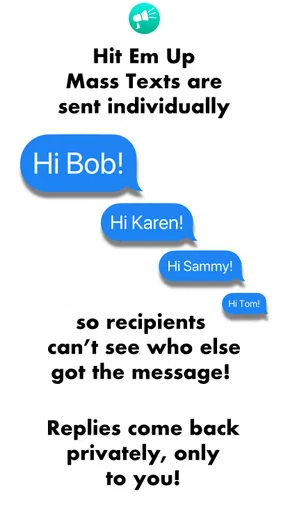
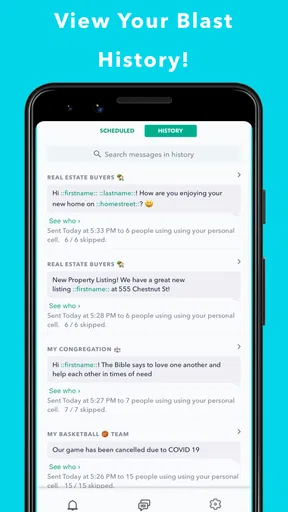
Let’s dive into what makes this app tick. First off, the ability to send personalized messages to a large group is a game-changer. You can customize each message with the recipient's name, making it feel like a personal note rather than a generic broadcast. This little touch can make a big difference in how your message is received.
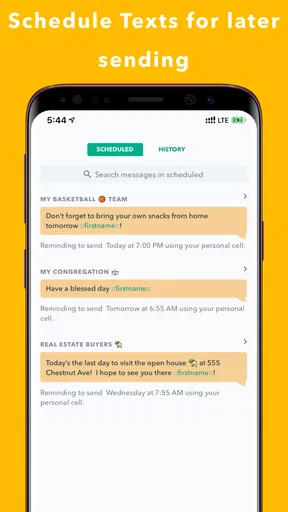
Another fantastic feature is the scheduling option. Imagine setting up your texts and having them sent automatically at a specified time. No more waking up in a cold sweat because you forgot to send that crucial reminder. Just set it and forget it.
Plus, the app supports multiple messaging platforms, so whether you’re a fan of iMessage or prefer good ol’ SMS, Hit Em Up has got you covered.
Getting Started
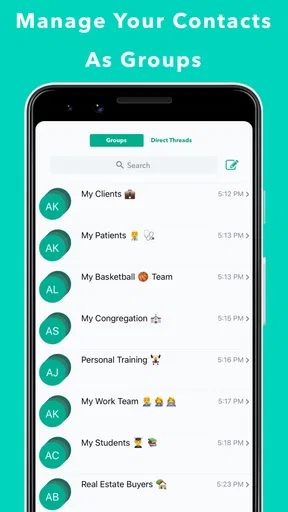
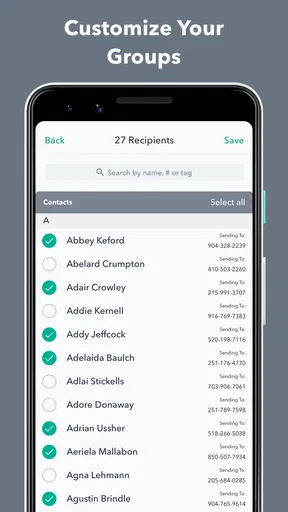
Setting up the app is as easy as pie. After downloading it from the app store, you’ll be guided through a simple setup process. The app syncs with your contacts, and you can create groups in a snap. From there, it’s just a matter of selecting your group, typing out your message, and hitting send. Simple, right?
One thing I appreciated was the app’s attention to detail. You can preview your message before it goes out, ensuring that everything is just right. It’s a small feature, but it goes a long way in preventing those "oops" moments.
Making the workflow safer and clearer
For a real-world example, imagine coordinating a weekend gathering when the location changes. I would select only the people who need the update, write the new address and time in plain language, then inspect the preview before sending. That last check matters: a message that is correct for one relative may not make sense to someone who was not part of the earlier conversation. Personalization can add warmth, but context still has to come from the words I write.
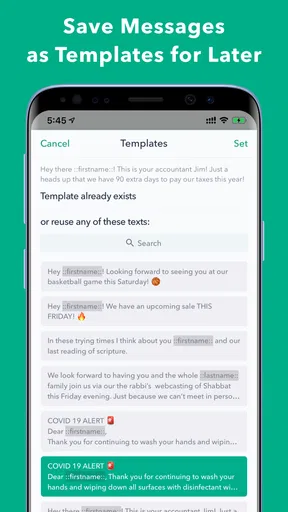
A useful habit is to prepare a reusable base message for recurring announcements, then review every detail that changes before sending. Names may be filled in, but dates, places, and instructions should never be treated as automatic. Scheduling can help when a reminder should arrive at a sensible time, yet it also means the message may go out later when circumstances have changed. I would recheck a scheduled text if plans are still in flux.
Another trade-off is how recipients handle replies. A mass message is efficient for distributing information, but it may prompt individual responses that become difficult to manage as the audience grows. If replies are important, say clearly what response you need and consider whether a group conversation or another channel would keep everyone informed. The best choice depends on whether the goal is simply to deliver an update or to have a discussion.
Who Is It For?
Hit Em Up is perfect for anyone who needs to communicate with large groups regularly. Whether you’re a business owner, event organizer, or just someone who loves staying in touch with friends and family, this app is a must-have.
I’ve found it particularly useful for organizing family gatherings and sending out party invites. The ability to send a personalized message to each recipient makes it feel like I’ve put in the extra effort, without actually having to put in the extra effort.
For a small business, I would keep the use case narrow: a practical service update to existing contacts is different from sending repeated sales messages to a broad list. For a community organizer, it can be handy for a clear logistical notice, while a shared group chat may work better when volunteers need to coordinate changes among themselves. And for someone who mostly exchanges one-to-one texts, the extra bulk workflow is probably unnecessary.
The Experience
Using this app has genuinely changed the way I communicate. It’s efficient, reliable, and incredibly convenient. Plus, the peace of mind that comes with knowing your messages will go out on time is priceless.
And let’s talk about speed. The app handles large lists effortlessly, ensuring that everyone gets the message without delay. It’s like having your own personal postman, minus the snail pace.
Even with a quick workflow, I would treat sending as a deliberate step rather than assuming that a large list is automatically the right list. Contacts change, groups can overlap, and a private detail that belongs in a one-to-one message should not be included in a general update. A short audience check protects both the sender and the people receiving the text.
Price, platform fit, and a fair verdict
The app is free to download, with in-app purchases listed from $12.99 to $179.99 per item. That range makes it sensible to explore the basic workflow before spending money; decide whether personalized bulk texting solves a recurring problem for you, rather than paying because the idea sounds convenient. It is rated for Everyone, and the current version is 3.25.0, with a minimum OS requirement of 7.0.
Compared with ordinary group messaging, the main distinction is control over individually addressed texts and a workflow aimed at sending to a list. A standard group chat is better when recipients should see one another’s replies and build a conversation. Manually sending separate texts offers more control but becomes tedious when the same update needs to reach many people. Hit Em Up sits between those approaches: more organized than repeated copy-and-paste, but not a substitute for a full messaging or customer-management platform.
My practical recommendation is to try it first with a small, familiar group and an uncomplicated announcement. Check whether the recipient selection, message preview, and sending process feel comfortable on your device. If the workflow fits, it can remove repetitive work; if your needs center on discussion, accessibility settings that the app does not work well with, or formal outreach management, another channel may serve you better.
Final Thoughts
If you’re someone who regularly finds themselves in need of sending mass texts, Hit Em Up: Mass Text Bulk SMS is definitely worth checking out. It’s packed with features designed to make your life easier, and its user-friendly approach means you don’t need a degree in computer science to use it.
So, the next time you’re on the verge of a messaging meltdown, remember there’s an app that’s got your back. Happy texting!
Verdict
Strengths of Hit Em Up: Mass Text Bulk SMS
- Efficient mass texting saves time.
- User-friendly interface is intuitive.
- Customizable messages add personalization.
- Supports both SMS and iMessages.
- Group management is straightforward.
Limitations of Hit Em Up: Mass Text Bulk SMS
- Limited free version features.
- No support for MMS attachments.
- Requires access to contacts.
- Occasional syncing issues reported.
- Subscription model may deter some users.
Similar Picks in This Category
View All
Google Messages
Google LLC4.6

Gmail
Google LLC4.1

Google Meet
Google LLC4.4

Google Chrome
Google LLC4.1

WhatsApp Messenger
WhatsApp LLC4.6

Carrier Services
Google LLC4.2
Frequently Asked Questions
What is Hit Em Up: Mass Text Bulk SMS used for?
Hit Em Up is designed to streamline the process of sending personalized mass text messages. It's particularly useful for small businesses, event organizers, or anyone needing to reach a large group of contacts simultaneously without making each message feel impersonal. The app leverages your existing contact list to customize messages efficiently.
Is Hit Em Up safe to use with my contact list?
Yes, Hit Em Up is designed with privacy in mind. It accesses your contact list solely for the purpose of message customization. The app does not store or share your contact information externally, ensuring that your data remains private and secure throughout your use of the app.
How does Hit Em Up personalize messages?
Hit Em Up uses placeholders within your message templates to insert personalized information, such as names, from your contact list. This feature allows each recipient to receive a message that feels tailored specifically to them, enhancing engagement and response rates compared to generic mass texts.
Can I schedule messages with Hit Em Up?
Yes, Hit Em Up offers the ability to schedule messages for future delivery. This feature is particularly helpful for planning reminders or announcements in advance, ensuring that your communications are delivered at the optimal time for maximum impact without requiring your active involvement.
Does Hit Em Up support multimedia messages?
While Hit Em Up primarily focuses on SMS, it also supports the inclusion of multimedia elements like images and videos through MMS. This capability allows you to enrich your messages, making them more engaging and informative for your audience, depending on their device and carrier capabilities.
